Almost every AWS workload I've built starts with the same question: what does the network look like? Get the VPC right and everything above it — load balancers, containers, databases — falls into place. Get it wrong and you'll be re-IPing production on a Saturday.
This post walks through the layout I reach for by default, why each piece is there, and the Terraform to stand it up.
The target architecture#
Three tiers, spread across (at least) two Availability Zones:
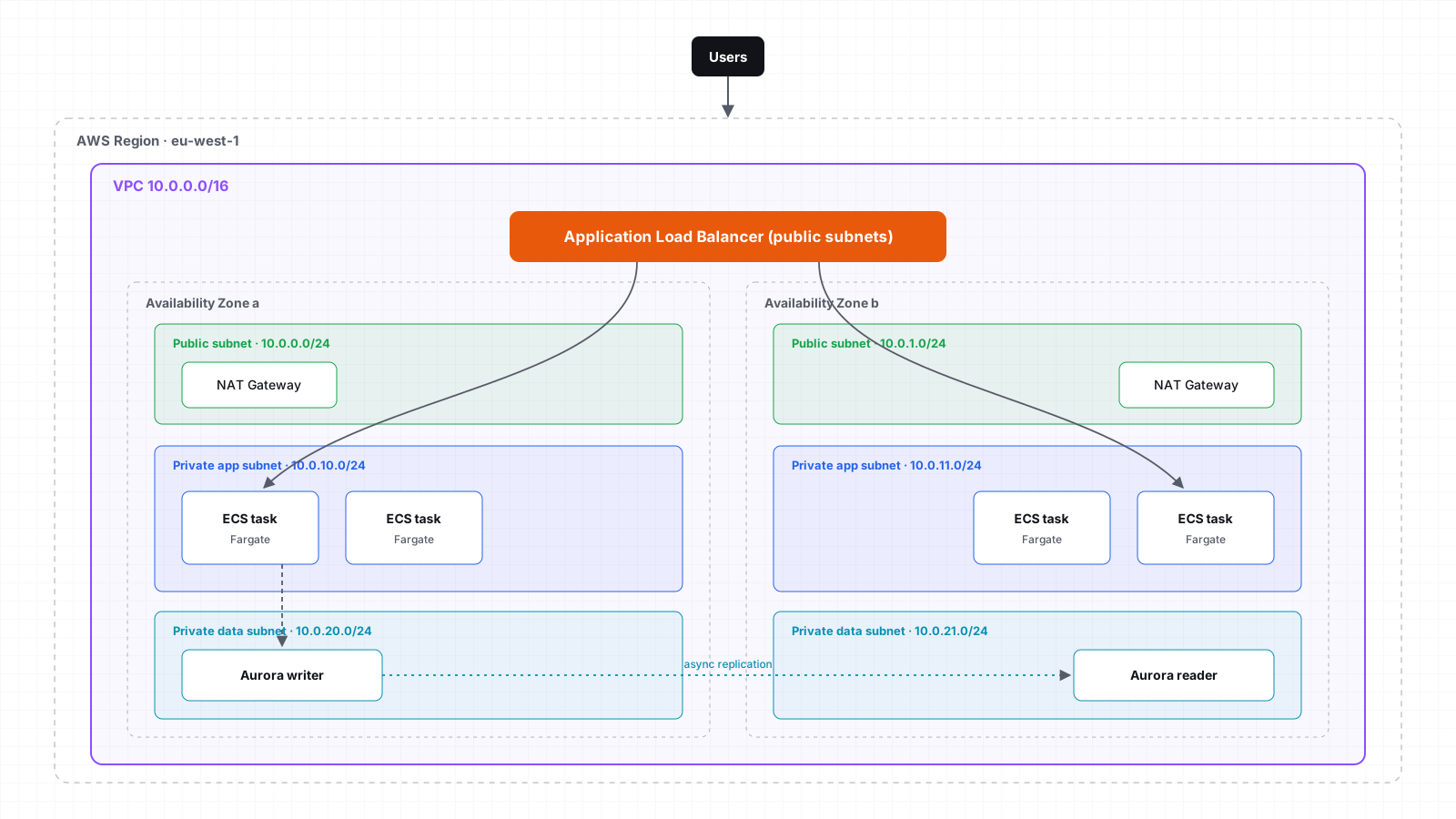
- Public subnets — internet-facing ALB and NAT gateways. Nothing else.
- Private app subnets — ECS/EKS tasks, Lambda ENIs, anything that runs your code.
- Private data subnets — RDS/Aurora, ElastiCache, OpenSearch. No route to the internet at all.
Sizing the CIDR blocks#
The most expensive mistake here is choosing a VPC that's too small. You can add secondary CIDRs later, but it's
messy. I use a /16 per environment and carve it predictably:
| Tier | AZ a | AZ b | AZ c | Usable IPs each |
|---|---|---|---|---|
| Public | 10.0.0.0/24 | 10.0.1.0/24 | 10.0.2.0/24 | 251 |
| Private app | 10.0.16.0/20 | 10.0.32.0/20 | 10.0.48.0/20 | 4,091 |
| Private data | 10.0.64.0/24 | 10.0.65.0/24 | 10.0.66.0/24 | 251 |
App subnets get the big /20 blocks because that's where IP consumption explodes — every Fargate task and every EKS
pod (with the VPC CNI) takes an IP address.
NAT strategy: one per AZ, or one total?#
A NAT gateway costs roughly $0.045/hour plus data processing. Three of them add up, so it's tempting to share one. Here's how I decide:
- Production: one NAT gateway per AZ. If AZ a fails and your only NAT lives there, every private subnet loses egress — the outage is no longer "one AZ", it's "everything".
- Dev / staging: a single NAT is fine. Accept the risk, save the money.
Building it with Terraform#
I lean on the community VPC module rather than hand-rolling every route table:
module "vpc" {
  source  = "terraform-aws-modules/vpc/aws"
  version = "~> 5.0"

  name = "${var.env}-core"
  cidr = "10.0.0.0/16"

  azs              = ["eu-west-1a", "eu-west-1b", "eu-west-1c"]
  public_subnets   = ["10.0.0.0/24", "10.0.1.0/24", "10.0.2.0/24"]
  private_subnets  = ["10.0.16.0/20", "10.0.32.0/20", "10.0.48.0/20"]
  database_subnets = ["10.0.64.0/24", "10.0.65.0/24", "10.0.66.0/24"]

  enable_nat_gateway     = true
  single_nat_gateway     = var.env != "prod"
  one_nat_gateway_per_az = var.env == "prod"

  enable_dns_hostnames = true
  enable_flow_log      = true

  tags = local.common_tags
}
The highlighted lines are the whole NAT strategy from above, expressed as one boolean per environment.
Keep S3 and DynamoDB traffic off the NAT#
Gateway endpoints are free and stop you paying NAT processing fees for traffic to S3 and DynamoDB:
resource "aws_vpc_endpoint" "s3" {
  vpc_id            = module.vpc.vpc_id
  service_name      = "com.amazonaws.${var.region}.s3"
  vpc_endpoint_type = "Gateway"
  route_table_ids   = module.vpc.private_route_table_ids
}
Verifying the layout#
After terraform apply, a quick sanity check that nothing in the data tier can reach the internet:
aws ec2 describe-route-tables \
  --filters "Name=tag:Name,Values=*database*" \
  --query "RouteTables[].Routes[?DestinationCidrBlock=='0.0.0.0/0']"
An empty list is exactly what you want.
Takeaways#
- Size generously — a
/16per environment,/20s for anything running containers. - Keep public subnets boring: load balancers and NAT only.
- NAT per AZ in production; a single NAT is a cost decision, not an architecture one.
- Add gateway endpoints on day one. They're free.
Next up, I'll put an ECS service on top of this network and wire up zero-downtime deployments.